Plugins · Instrument
DrumRack Pro
In developmentDrum sampler and drum synth in one.
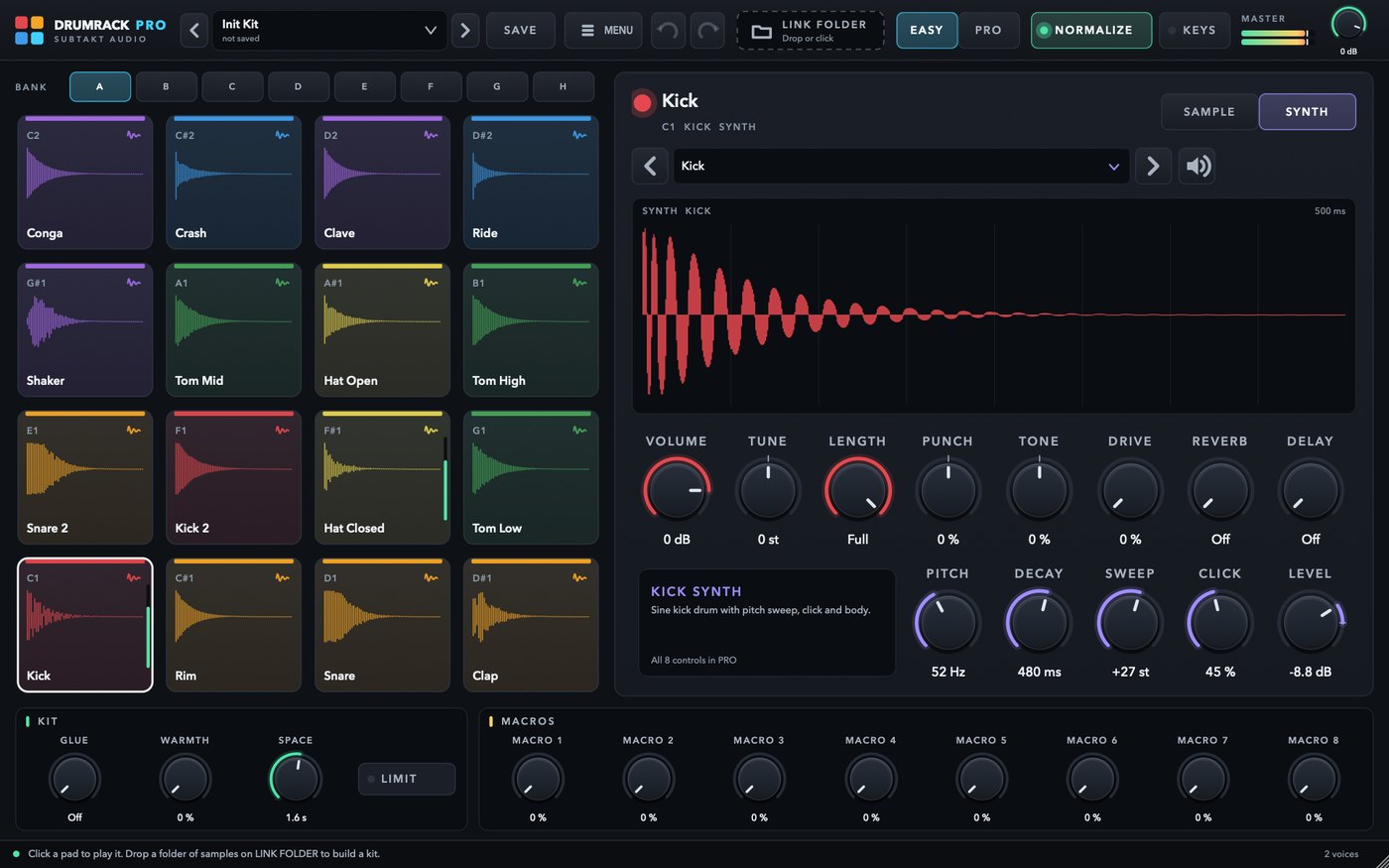
Eight banks of 16 pads, each pad with samples or a built-in sound generator, a channel strip per pad, send effects and a master chain. A sample folder is laid out across the pads by fixed rules and loudness-matched. This has been checked with its own tests; it has not yet been proven in everyday use.
Background
Problem and solution
The problem
A folder of drum samples usually lands in a sampler unsorted: kick, snare and hats sit on different pads in every kit and at different levels. Sorting and matching happen by hand.
The solution
DrumRack Pro lays out a linked folder across the pads in a fixed order — same folder, same result — and matches the loudness of every sample without changing the file. It has not yet been tried in everyday use.
Features
What DrumRack Pro does
Fixed layout
Eight banks A–H of 16 pads each, one pad per MIDI note. In bank A: C1 kick, C#1 rim, D1 snare, D#1 clap, F#1 closed hat, A#1 open hat, C#2 crash and D#2 ride. Whatever does not fit in bank A goes to the next bank.
Link a folder
A sample folder is read, each file assigned to a category by its file and folder name, and laid out. With ◀ ▶ a pad steps through the other samples of the same category.
Up to 8 layers per pad
Layers with velocity ranges, in velocity, round-robin or random mode. Every layer can be played in reverse.
8 sound generators
Instead of samples, a pad can play a built-in sound generator: kick, snare, clap, hat, tom, cymbal, FM perc or noise, each with 8 controls. The Init Kit is made entirely of them.
Normaliser
Every sample is measured on loading and loudness-matched (up to ±24 dB, peak at most −1 dBFS). The file stays unchanged, and the adjustment can be reset.
Channel strip per pad
Pitch envelope, amp envelope, filter, transient shaping, drive with 4× oversampling, tone and EQ. Plus choke groups, two sends and 16 stereo outputs.
Effects and master
Reverb (room, plate, hall) and delay (digital or tape, free or synced to the host tempo) as sends. On the master: bus compressor, saturation and a limiter or clipper. 16 macros can be assigned to pad controls.
Kit library and views
Save kits into banks, optionally with a copy of the samples, search them and import whole folders as a bank. Two views of the same controls: EASY with a few large controls, PRO with everything. Undo over 100 steps, interface from 70 to 200%.
Workflow
How it is meant to work
Load as an instrument
Put DrumRack Pro on an instrument track as AU or VST3. A new instance starts with the Init Kit of 16 sound-generator pads.
Link a folder
Drag a sample folder onto LINK FOLDER or pick one there. The samples are laid out across the pads and loudness-matched; swap single pads with ◀ ▶.
Shape and save
Work on the sound in EASY or PRO, then save it with SAVE or Cmd+S as a kit in a library bank.
To be honest
- Not yet proven in everyday use. Sound and levels have so far been measured and inspected in a spectrogram; feedback from real sessions has not gone into it yet.
- macOS on Apple Silicon only. There is no build for other systems.
- Distribution recognises samples by name only, meaning file and folder names, not by sound. Loops and files longer than 20 seconds are not distributed.
- Cymbals and hats from the sound generators are, by the measurements, electronic rather than acoustic in character. Only one kit built from these generators is included, no samples.
State of things
What has been checked — and what hasn’t
DrumRack Pro is in development. There is no download yet. Version 0.1.0.
Checked
- Self-test with 88 checks and no failures, also in a build with runtime checks (UBSan)
- Off-screen interface test: 29 checks and no failures, layout at four sizes from 70 to 200%
- pluginval at strictness level 10 passed for VST3 and AU (two warnings for the AU)
- AU validation (auval) passed
- No memory allocation on the audio thread across 700 blocks of importing, loading, browsing and saving
Open
- Feedback from real sessions in a DAW is still missing
- Sound so far only measured, not yet tuned by ear
- Only checked off-screen: dragging from the Finder, menus, file dialogs, keyboard
- In the AU, the 15 additional outputs cannot be switched off once created
- Not included: step sequencer, plugins on pads, recognition by sound