Plugins · Instrument
UltimateSynth Pro
BetaA polyphonic synthesizer for the Mac.
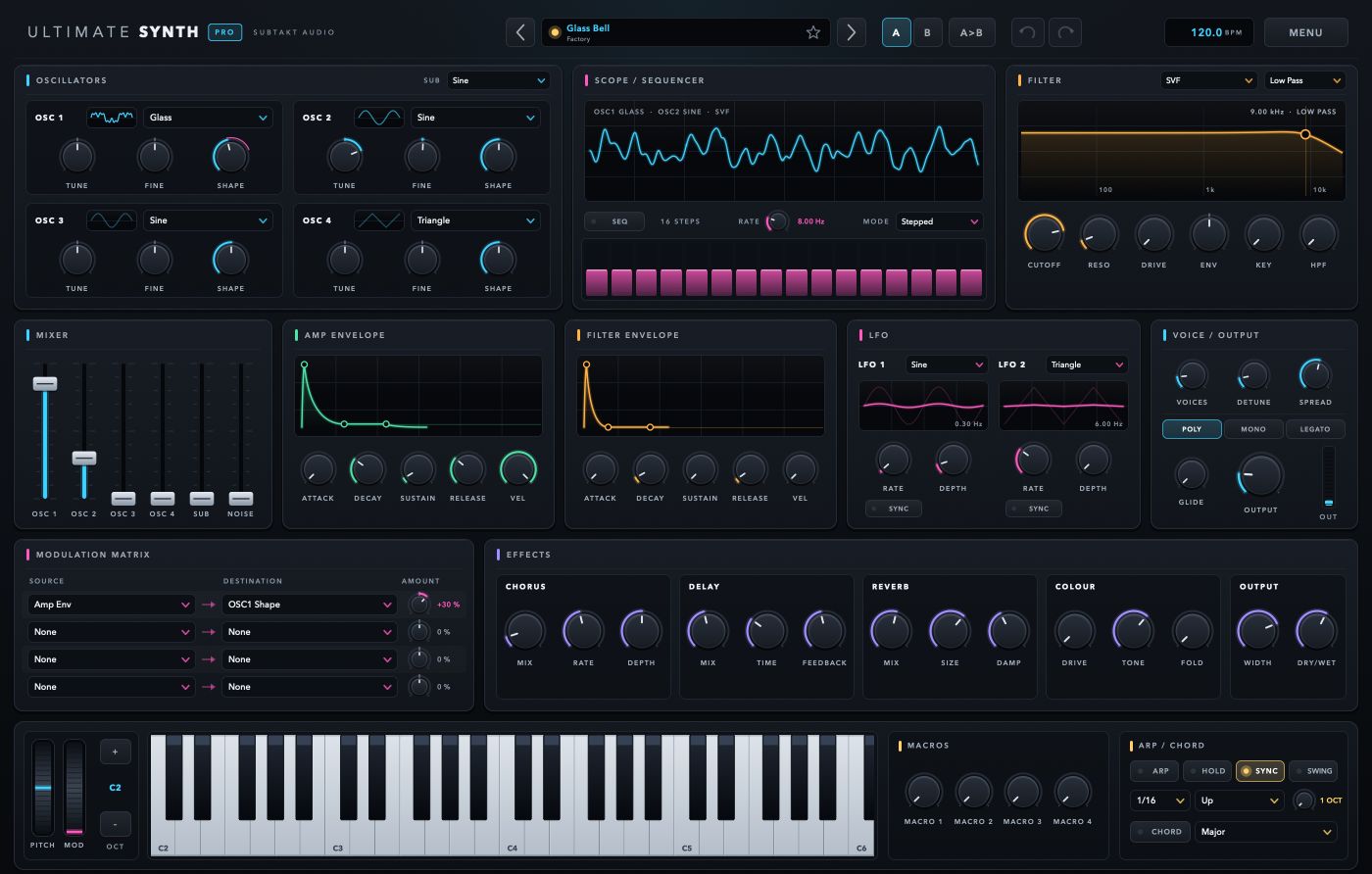
Up to 16 voices, four wavetable oscillators plus sub and noise, SVF and ladder filters, a modulation matrix, a sequencer and an arpeggiator. Plus an importer that translates your own Spire, Serum 2 and Diva presets as a sonic approximation.
Features
What UltimateSynth Pro does
Sound sources
Four wavetable oscillators, each with tune, fine and shape, plus a sub oscillator and noise in the mixer.
Two filter designs
SVF and ladder with cutoff, resonance and drive. The filter envelope works in semitones (±96), plus key tracking and a 12 dB/octave high-pass.
Modulation
Two LFOs with tempo sync (note values from 2/1 to 1/64, dotted and triplet too), a modulation matrix and four macros.
Sequencer and arpeggiator
A 16-step sequencer, an arpeggiator with hold, sync and swing, and a chord function.
Voices
Up to 16 voices. Poly, mono or legato, glide up to 5 seconds, unison with detune and spread.
Effects
Chorus, delay, reverb and a colour stage with drive, tone and fold, plus stereo width and dry/wet at the output.
Compare and undo
A/B comparison with its own undo history per slot, undo/redo by shortcut, a preset browser with search, tags and favourites. The interface scales from 70 to 200%.
Preset import
Reads your own preset files from Spire, Serum 2 and Diva — single files or whole folders — and translates them as a sonic approximation, loudness-matched. Not a 1:1 sound: whatever cannot be mapped is noted in the preset.
Workflow
Getting started
Install
Download the DMG, run the installer script (see the installation note), then restart the DAW or rescan plug-ins.
Load as an instrument
Put UltimateSynth Pro on an instrument track as AU or VST3. A new instance starts with the factory preset “Init”.
Presets and import
Step through with ◀ ▶ or open the browser. Bring in your own Spire, Serum 2 and Diva presets from the preset display menu.
To be honest
- Never tested in practice inside a DAW. The software has been checked with its own self-tests, not in real sessions.
- The current build only runs on a recent version of macOS and only on Apple Silicon. There is no standalone version in the package.
- Factory presets are included, third-party presets are not — the importer only reads files you own, and gives an approximation, not an identical sound.
Download
UltimateSynth Pro — download coming soon
For macOS on Apple Silicon. No account, no tracking, no cost.
The beta is being prepared. As soon as the file is ready, it will appear here and on the downloads page.
System requirements
- Apple Silicon (M1 or later)
- Formats: AU and VST3
- A DAW that loads AU or VST3 instruments
Installation and Gatekeeper
The plugins are not notarized by Apple yet. The DMG contains an installer script, “Install UltimateSynth Pro.command”. It installs into your own user account only (~/Library/Audio/Plug-Ins) and doesn’t ask for a password itself. macOS will still block it the first time you double-click it.
- macOS 15 and later (including macOS 26): double-click the script once — macOS blocks it. Then open System Settings → Privacy & Security, go to the “Security” section, click “Open Anyway” and confirm with your login password. The button is only offered for about an hour after the attempt to open the script. Right-click → “Open” no longer works from macOS 15 on.
- macOS 12 to 14: right-click (or Ctrl-click) the script → “Open” and confirm.
- Afterwards: restart your DAW or rescan plug-ins.
By hand, without the script: copy the plugin bundles from the DMG yourself — .component to ~/Library/Audio/Plug-Ins/Components, .vst3 to ~/Library/Audio/Plug-Ins/VST3. Then remove the quarantine attribute in Terminal, once per bundle:
xattr -dr com.apple.quarantine "<path to the bundle>"Then restart your DAW.
To be honest: we have not yet walked through the script from the DMG on macOS 15 or macOS 26 in practice. The steps above follow how macOS behaves there; they are not tested yet.